Flare-on 11
Introduction
This year's Flare-On challenge already kicked off strong with some interesting mentions in the categories:
This year’s contest may be the most diverse ever, with 10 challenges covering architectures including Windows, Linux, JavaScript, .NET, YARA, UEFI, Verilog, and Web3. Yes, you read that correctly, there is a YARA challenge this year - Google Cloud Blog
The YARA challenge definitely sounded interesting at the time because of how they would design a challenge inside YARA itself.
Challenge 1 - frog
From the looks of it, this year we have another game as the first challenge. Our task is to get the frog to the "11" statue, upon which we'll get our flag. So, let's boot up the first challenge and see what's awaiting us.
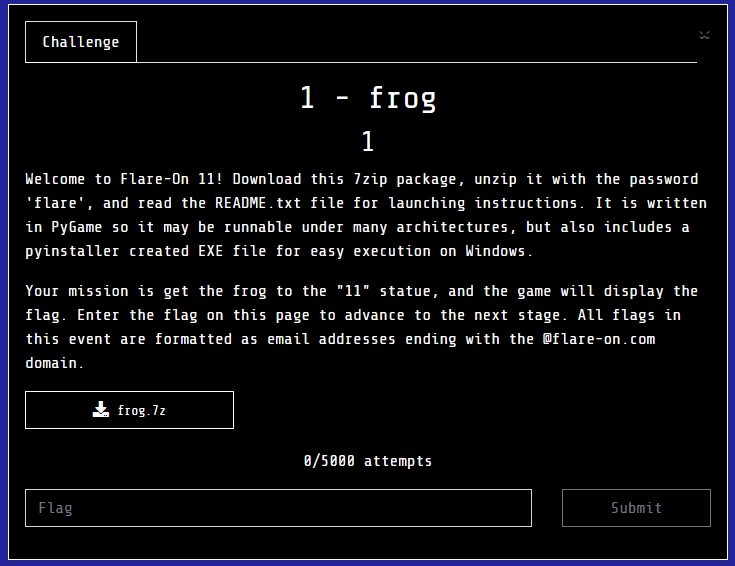
PyGame window
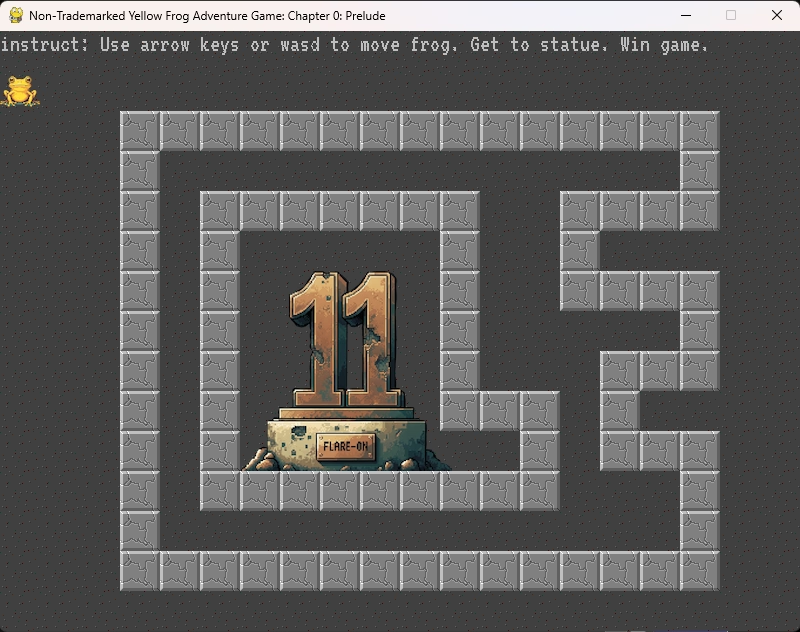
Passing the barriers
My first idea was to see whether there is some hidden entrance that looks like any other wall, but that we can actually pass through. Doing this I did, indeed, find an entrance on the righ-hand side of the walls:
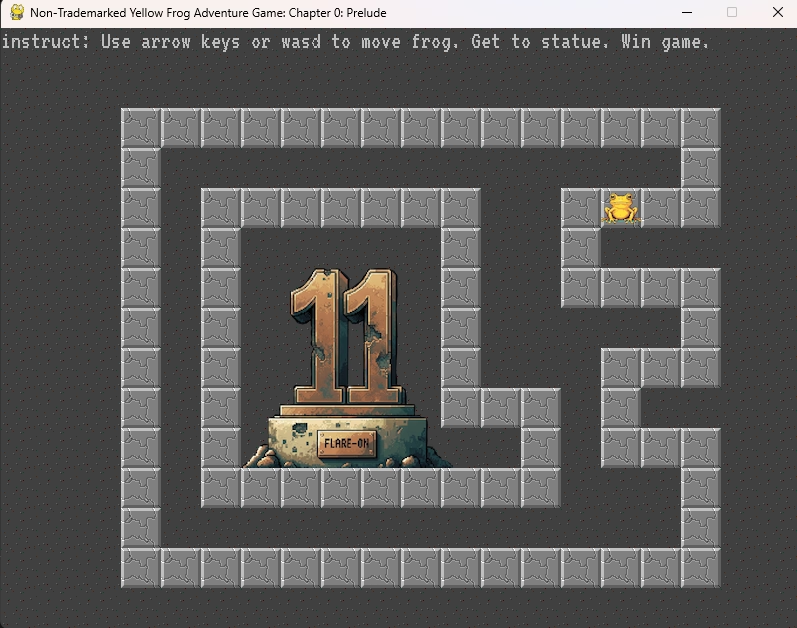
At this point, I did think that they might put in something so that the second barrier wouldn't be as straightforward to pass through. However, upon starting to look for hidden entrances I found the second entrance:
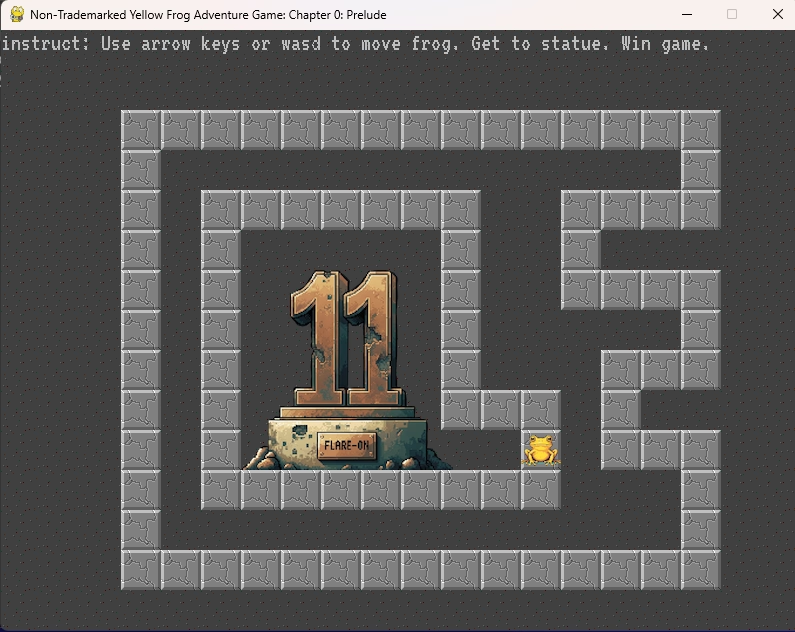
Flag
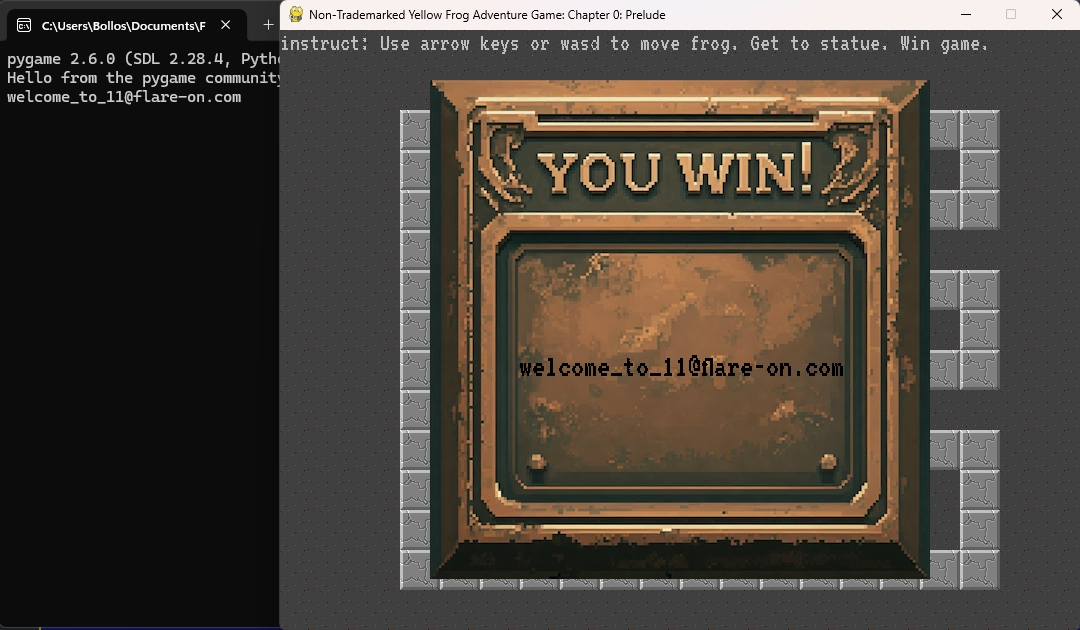
And upon stepping through the second barrier we get shown the flag and the first challenge is out of the way of this year's Flare-On!
Challenge 2 - checksum
Side note
Now this challenge, this challenge costed me a lot of time because I was way overthinking it. At the time when Flare-On 11 ran I was in Prague for SANS and didn't have a lot of time to really look at the challenges. I had a couple hours per day to look at this challenge and my progress felt slow. I have aptly named this section of pure time waste "The grand (de)tour" as this about sums up what I was doing.
The challenge binary itself
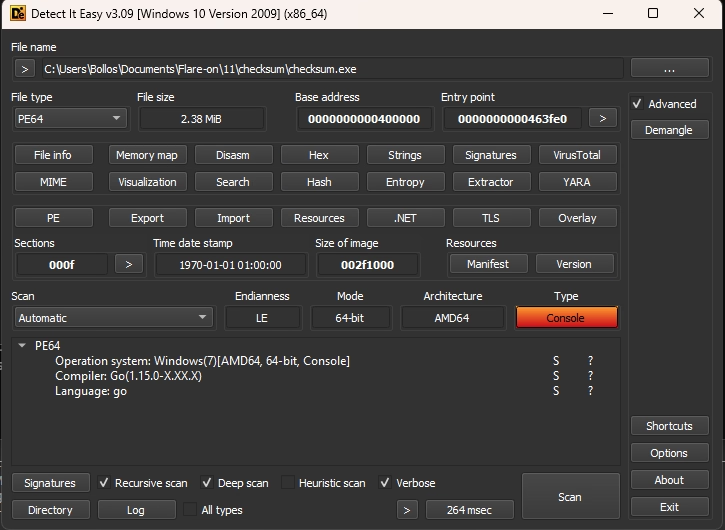
I first threw the binary into Detect it Easy to get an idea whether this is a .NET/C/Go/Rust/etc. binary. This revealed that, the binary is a Go binary, which explains its size of 2,38 MB:
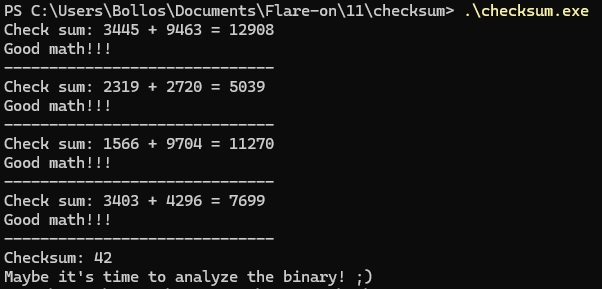
Next, I ran the binary to see what would happen and perhaps also explain why the challenge is named "checksum". Running the binary revealed that it asks for a checksum by adding two numbers together a couple times. After a couple successful checksums it asks for only a checksum, after which if the incorrect input is given that we take a look at the binary instead:
So let's load the binary into IDA and see where that takes us.
Initial IDA analysis
As with most if not all Go binaries we can filter out the noise created via static linking by searching for "main_" in the IDA function list. Doing this leaves us with 3 functions to look at:
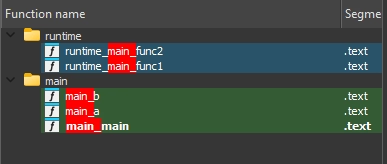
I first looked at
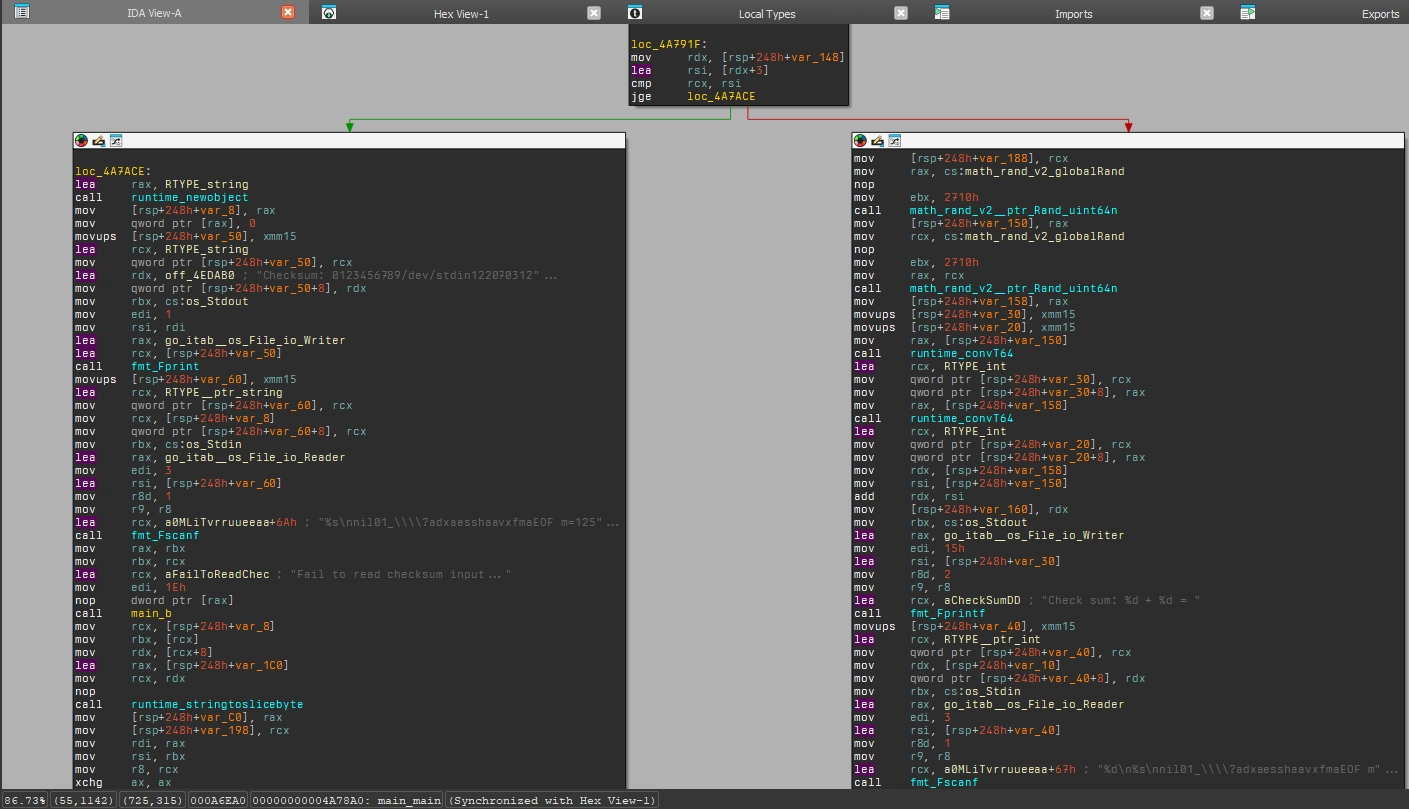
main_main as this would be
the actual "main" of the binary. This function handles the
loop which either spits an addition question or the checksum
with a freeform input. The amount of addition questions is
randomly decided upon at launch, and thus varies between
runs. The right path handles the addition questions, with
the left handling the freeform checksum input:
Way down we also find our message that we should look at the
binary in loc_B57CE4 which
is present after mentions of the ChaCha20 cipher:
                        IDA disassembly at 0xB57C69
                        nop
                        movups  [rsp+248h+var_70], xmm15
                        mov     qword ptr [rsp+248h+var_70+8], 20h ; ' '
                        lea     rdx, aChacha20poly13_3 ; "chacha20poly1305: bad key length"
                        mov     qword ptr [rsp+248h+var_70], rdx
                        xor     ecx, ecx
                        lea     rdx, go_itab__errors_errorString_error
                        xor     ebx, ebx
                        lea     rsi, [rsp+248h+var_70]
                        jmp     short loc_B57CE4
                        IDA disassembly of loc_B57CE4 at 0xB57CE4"
                        loc_B57CE4:
                        mov     [rsp+248h+var_C8], rbx
                        mov     [rsp+248h+var_1A0], rcx
                        mov     rax, rdx
                        mov     edi, 29h ; ')'
                        mov     rbx, rsi
                        lea     rcx, aMaybeItSTimeTo ; "Maybe it's time to analyze the binary! "...
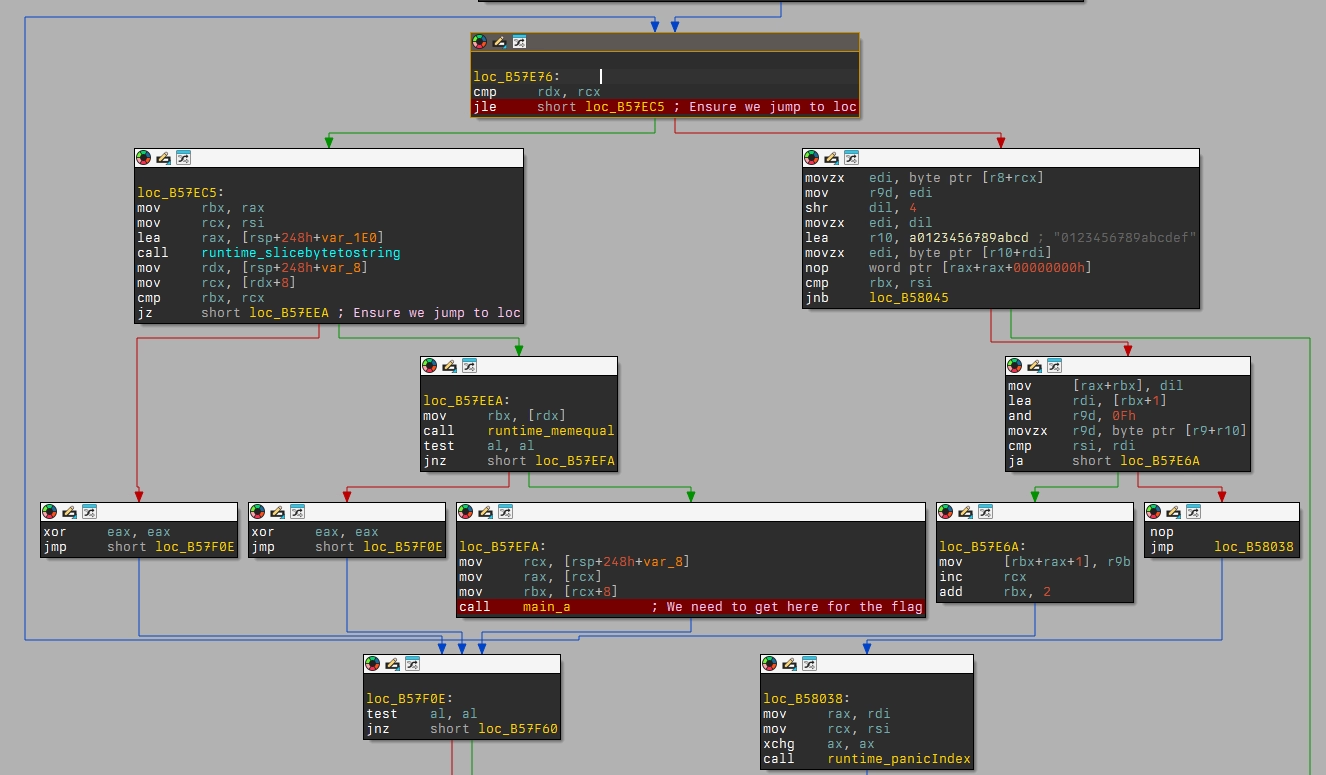
Down a bit more we get to
0xB57E76 which contains the
following basic blocks involving the singular call to
main_a:
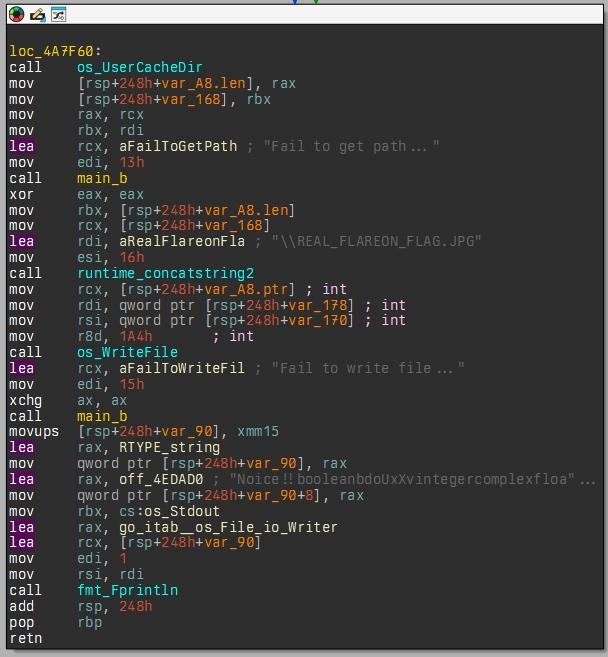
If main_a succeeds we get
to a basic block which gets the location of the user's cache
directory, and then attempts to write
REAL_FLAREON_FLAG.JPG to
it, after which it prints
Noice!! in case it
succeeds:
Lastly, I took a look at `main_a`; this function appeared to contain some base64 encoded string and a string which referenced Flare-On:
                            Base64 encoded string in IDA disassambly"
                            loc_4A785A:
                            lea     rbx, aCqofrqerx1yavw ; "cQoFRQErX1YAVw1zVQdFUSxfAQNRBXUNAxBSe15"...
                            mov     ecx, 58h ; 'X'
                            call    runtime_memequal
                            Flare-On string in IDA disassembly"
                            loc_4A77EA:
                            lea     r8, aTrueeeppfilepi+0BF4h ; "FlareOn2024bad verb '%0123456789_/dev/s"...
                            movzx   r9d, byte ptr [rax+r8]
                            xor     edx, r9d
                            mov     [rsi+rbx], dl
                            inc     rbx
                            mov     rax, rsi
                            mov     rdx, rdi
I tried decoding the base64 encoded string, however, this resulted in some garbage output that I then put aside for later (mistakenly).
And this is where the detour begins…
The grand (de)tour
I had some clues about what was going on within this binary at this point:
- Calculates an amount of additions to perform before actual challenge input is presented;
- Uses ChaCha20 cipher for *something* relating to our input most likely;
- Contains references to Flare-On;
- Contains a base64 string;
- An image as output.
Because I attending FOR610 in Prague at the time, I did not think I had the time to look at this much statically. Because of this, I decided to just attach the binary up to IDA's debugger, try and brute-force my way to `main_a` and let it write the image to disk afterwards.
Things didn't go as smooth as I had intended for them to go, of course. The breakpoints I had set would not trigger, or if they would, I would then step into/over/out of a function and execution would exit. Another unexpected thing was that my debugger would sometimes hit *something* in an `async` routine and I couldn't find an easy way to avoid these breakpoints. Another nuisance was being trapped in `main_b` which, sometimes, would exit execution.
Getting a bit fed up with constantly having to do a random amount of additions, I started patching out sections that I thought were causing me grief. This, however, lead me to a situation in which my binary would now panic at random points due to invalid memory addresses. A funny aside is that because of these crashes, I figured out the challenge author (hello :wave:)

At this point I got pretty stuck. Debugging and forcing it to print the JPG only got me a zero-byte file and I couldn't get the binary to actually dump the image contents to disk. I decided to call it a day and come back to Flare-On later, more refreshed and with new ideas.
Going static
I had some ideas for what to do, but trying to work them out gave me a `/0` math error in my head. I asked a mate who'd solved the challenge at this point whether my ideas made sense, and they turned to make sense.
I had come to some sort of a realisation that `main_a` must be of some importance. It was way down the binary, only reachable via some paths and it was also the path to get the JPG to disk. So, here's `main_a` in all its glory:
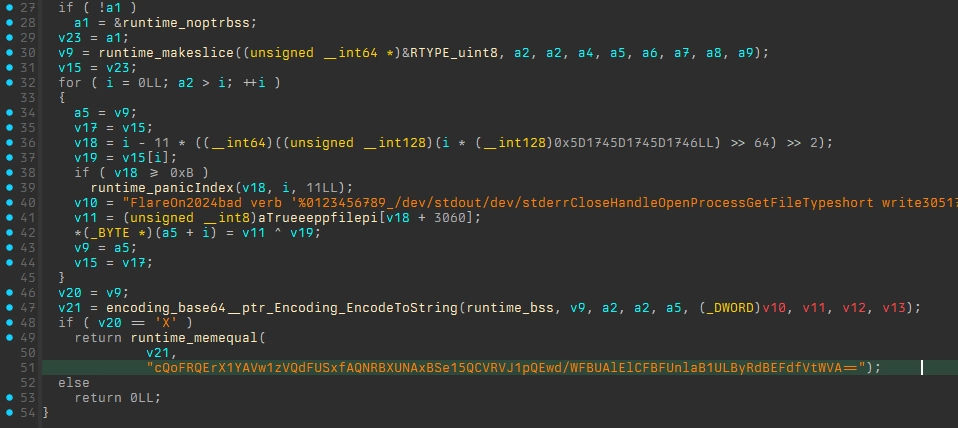
`main_a` returns either true or false depending on whether this `v21` is equal to a base64 encoded string. `v21` is the result of base64 encoding some kind of input array in which also `v11` is present. `v11` contains our `FlareOn2024` string and is used as an XOR key with `v19` which traces back to argument 1 or `a1`.
At was at this moment that it all clicked and explained why I was getting 'garbage' from from that base64 string I had looked at in the beginning! Returning back to cyberchef and adding the `FlareOn2024` string as an XOR key on the base64 decoded output resulted in what appeared to be hex characters:
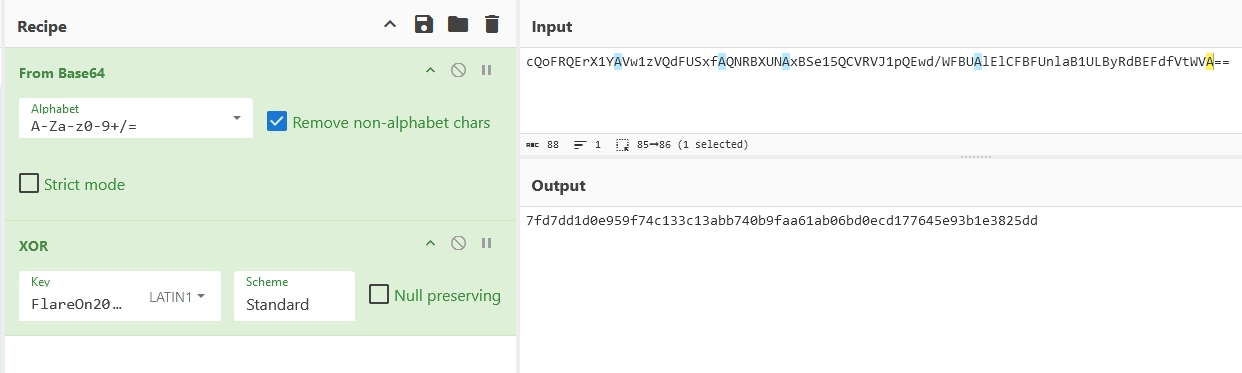
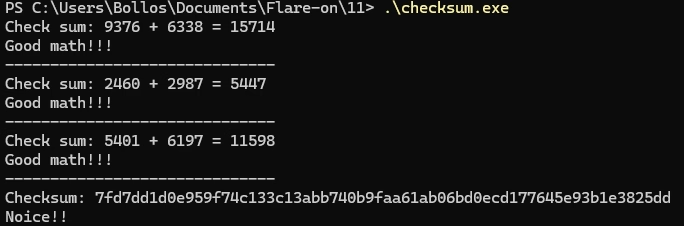
To test whether this was actually our desired input I pasted this string into the original unmodified binary, and low-and-behold, it printed the expected `noice!!` as output!
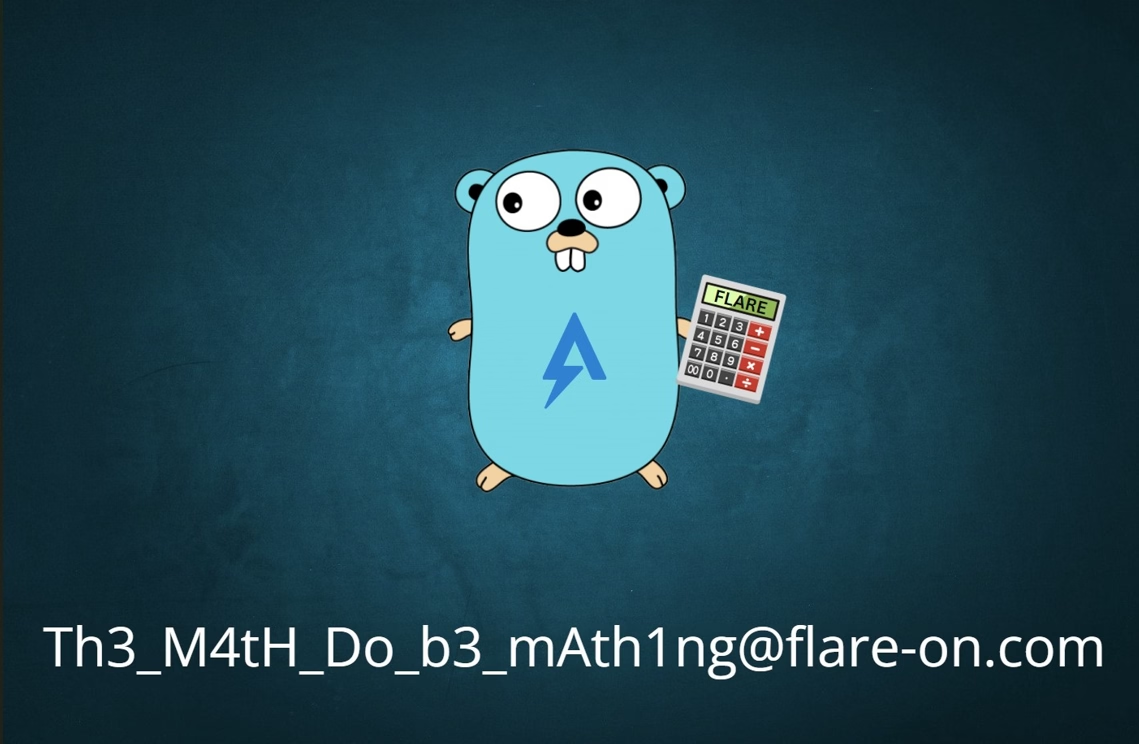
Checking the cache directory once more to see whether our `REAL_FLAREON_FLAG.JPG` actually contained some bytes revealed that it did and that it contained the Go mascot with our flag: :partying_face:
Challenge 2 - aray
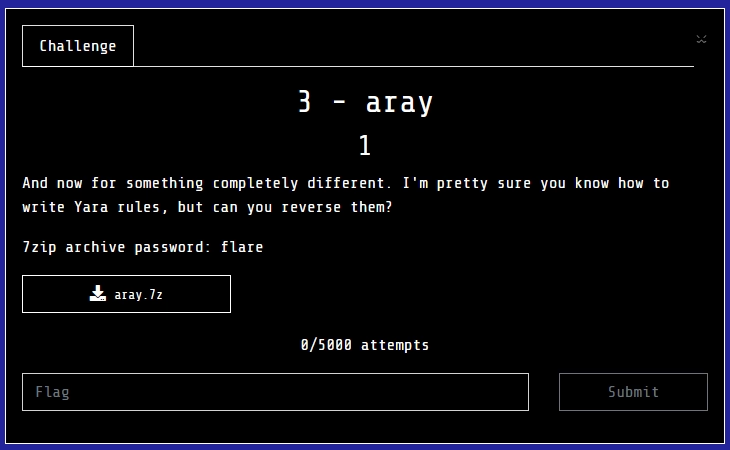
The YARA rule itself
Upon opening the YARA rule in VS Code we are greeted by the following blob of text:
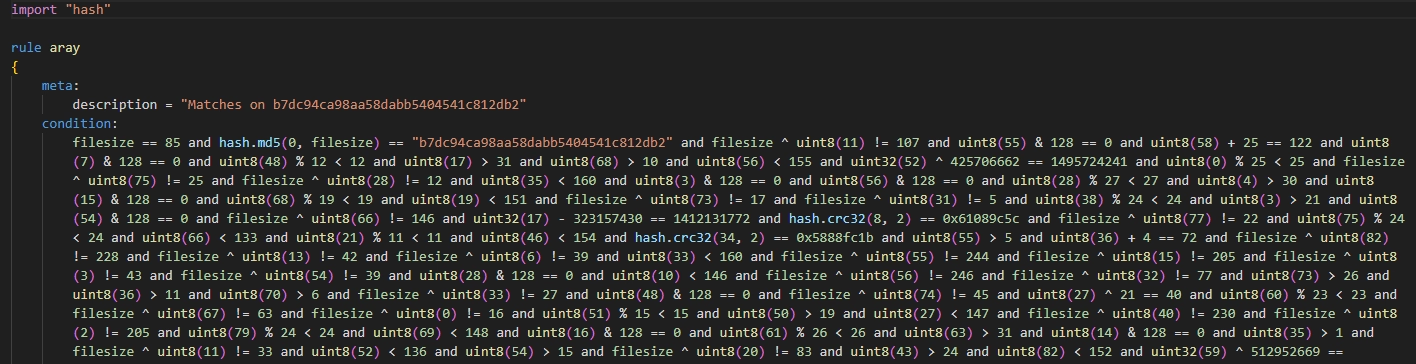
Next, I stared at this wall of text for a while hoping it would start to make sense. After a while I noticed that the `uint8`s came in multiple pairs:
                            Pairs of uint8s within the YARA rule"
                            SNIP
                            filesize ^ uint8(11) != 107 and
                            filesize ^ uint8(11) != 33 and
                            uint8(11) > 18 and
                            uint8(11) % 27 < 27 and
                            uint8(11) < 154 and
                            uint8(11) & 128 == 0 and
                            SNIP
                            uint8(55) & 128 == 0 and
                            uint8(55) > 5 and
                            filesize ^ uint8(55) != 244 and
                            uint8(55) % 11 < 11 and
                            filesize ^ uint8(55) != 17 and
                            uint8(55) < 153 and
                            SNIP
Next I realised that some of these checks are always true, and therefor probably not relevant to the core challenge and thus removed them from the rule. Besides `uint8`s there are also some `uint32` checks being performed:
                            uint32 calculations within YARA rule"
                            uint32(52) ^ 425706662 == 1495724241 and
                            uint32(17) - 323157430 == 1412131772 and
                            uint32(59) ^ 512952669 == 1908304943 and
                            uint32(28) - 419186860 == 959764852 and
                            uint32(66) ^ 310886682 == 849718389 and
                            uint32(10) + 383041523 == 2448764514 and
                            uint32(37) + 367943707 == 1228527996 and
                            uint32(22) ^ 372102464 == 1879700858 and
                            uint32(46) - 412326611 == 1503714457 and
                            uint32(70) + 349203301 == 2034162376 and
                            uint32(80) - 473886976 == 69677856 and
                            uint32(3) ^ 298697263 == 2108416586 and
Alongside these were also the checks which used the `filesize` variable as an XOR key or within a md5 hash:
                            filesize ^ uint8(75) != 25 and
                            filesize ^ uint8(28) != 12 and
                            filesize ^ uint8(73) != 17 and
                            filesize ^ uint8(31) != 5 and

                            hash.md5(0, filesize) == "b7dc94ca98aa58dabb5404541c812db2" and
This `filesize` variable made me think that perhaps the challenge was to figure out which XOR key would match these conditions. This, sadly, didn't really get me anywhere and at this point I got stuck not knowing what to do to solve this challenge.
Solving this challenge
After not getting anywhere I decided to take a break. During this time some colleagues of mine worked their way through challenge 2 and also started working on 3. And it was with their help that I then also managed to clear this challenge.
NOTE: I might get back to this challenge and do a proper writeup at some point. For now I won't go into details as I mostly used their scripts and filling in the gaps to get to the solution.
Lessons learned
Whatever kind of challenge category this challenge falls under, I need to practice more on them to spot the obvious tells that I missed in this one.
Challenge 4 - meme maker 3000
The challenge description already gives away that we'll be looking at JavaScript so let's see what its in store this year.
The web app itself
Opening the `.html` file reveals that it is indeed a meme maker:
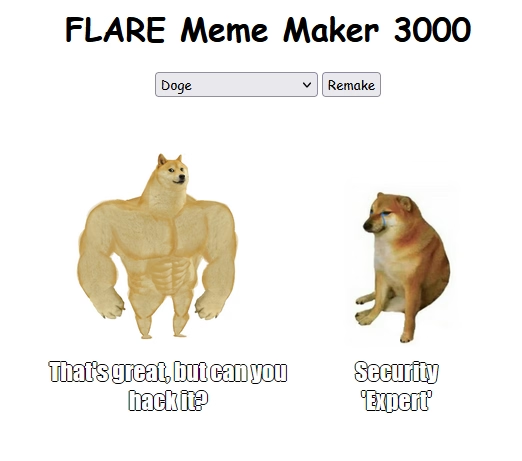
Looking at the underlying JavaScript reveals the typical mess of obfuscated, well, everything. An excerpt is shown below for demonstration:
JavaScript code behind the Meme Maker 3000 web app" linenums="1"
Deobfuscating the JavaScript
Running the obfuscated mess through deobfuscate.relative.im] cleans it up pretty much perfectly. From the cleaned up JavaScript we can observe the following interesting bits:
                            Array of captions to be used in the meme maker" linenums="1"
                            const a0c = [
                                'When you find a buffer overflow in legacy code',
                                'Reverse Engineer',
                                'When you decompile the obfuscated code and it makes perfect sense',
                                'Me after a week of reverse engineering',
                                'When your decompiler crashes',
                                "It's not a bug, it'a a feature",
                                "Security 'Expert'",
                                'AI',
                                "That's great, but can you hack it?",
                                'When your code compiles for the first time',
                                "If it ain't broke, break it",
                                "Reading someone else's code",
                                'EDR',
                                'This is fine',
                                'FLARE On',
                                "It's always DNS",
                                'strings.exe',
                                "Don't click on that.",
                                'When you find the perfect 0-day exploit',
                                'Security through obscurity',
                                'Instant Coffee',
                                'H@x0r',
                                'Malware',
                                '$1,000,000',
                                'IDA Pro',
                                'Security Expert',
                              ],
                            Array of templates with positions and percentages" linenums="1"
                              a0d = {
                              doge1: [
                                ['75%', '25%'],
                                ['75%', '82%'],
                              ],
                              boy_friend0: [
                                ['75%', '25%'],
                                ['40%', '60%'],
                                ['70%', '70%'],
                              ],
                              draw: [['30%', '30%']],
                              drake: [
                                ['10%', '75%'],
                                ['55%', '75%'],
                              ],
                              two_buttons: [
                                ['10%', '15%'],
                                ['2%', '60%'],
                              ],
                              success: [['75%', '50%']],
                              disaster: [['5%', '50%']],
                              aliens: [['5%', '50%']],
                            },
                            a0e = {
                              'doge1.png':
                            }
                            a0l function which adds event listeners to the caption boxes" linenums="1"
                            const caption1 = document.getElementById('caption1'),
                              caption2 = document.getElementById('caption2'),
                              caption3 = document.getElementById('caption3')
                              caption1.addEventListener('keyup', () => {
                                flagfunc()
                              })
                              caption2.addEventListener('keyup', () => {
                                flagfunc()
                              })
                              caption3.addEventListener('keyup', () => {
                                flagfunc()
                              })
And lastly, the `a0k` function which can also be observed in the snippet above where it is called by an event listener for a "keyup" event (we'll get to that in a minute):
                        a0k function which is called by eventlisteners" linenums="1"
                        function flagfunc() {
                        const a = MemeImage.alt.split('/').pop()
                        if (a !== Object.keys(MemeImagesData)[5]) {
                            return
                        }
                        const b = caption1.textContent,
                              c = caption2.textContent,
                              d = caption3.textContent
                        if (
                            MemeCaptionText.indexOf(b) == 14 &&
                            MemeCaptionText.indexOf(c) == MemeCaptionText.length - 1 &&
                            MemeCaptionText.indexOf(d) == 22
                        ) {
                            var e = new Date().getTime()
                            while (new Date().getTime() < e + 3000) { }
                            var f =
                                d[3] +
                                'h' +
                                a[10] +
                                b[2] +
                                a[3] +
                                c[5] +
                                c[c.length - 1] +
                                '5' +
                                a[3] +
                                '4' +
                                a[3] +
                                c[2] +
                                c[4] +
                                c[3] +
                                '3' +
                                d[2] +
                                a[3] +
                                'j4' +
                                MemeCaptionText[1][2] +
                                d[4] +
                                '5' +
                                c[2] +
                                d[5] +
                                '1' +
                                c[11] +
                                '7' +
                                MemeCaptionText[21][1] +
                                b.replace(' ', '-') +
                                a[11] +
                                MemeCaptionText[4].substring(12, 15)
                            f = f.toLowerCase()
                            console.log(f)
                            alert(atob('Q29uZ3JhdHVsYXRpb25zISBIZXJlIHlvdSBnbzog') + f)
                            }
                        }
Even without much further analysis, this `a0k()` function already looks interesting. It contains an `alert()`, what looks like offsets for a character string, and it contains some checks before it event attempts to do something. Now, obviously the question is, how do we get to this `a0k()` function and what is this "keyup" event listener?
Entering a0k
The amazing Mozilla Developer Network documentation describes the "keyup" and "keydown" events as follows in the context of the `.addEventListener()` function:
The keydown and keyup events provide a code indicating which key is pressed, while keypress indicates which character was entered. For example, a lowercase "a" will be reported as 65 by keydown and keyup, but as 97 by keypress. An uppercase "A" is reported as 65 by all events.
With this information, I set a breakpoint on the entry of `a0k()` and started pressing buttons. After a bit I realised that the captions were textboxes themselves, and when pressing a button inside *those* that my breakpoint had hit :partying_face:!
Figuring out the correct conditions
The first check is whether some value `a` matches the value at offset `5` of the list of available meme templates:
                            if (a !== Object.keys(MemeImagesData)[5]) {
                                return
                            }
Performing this expression ourselves within the FireFox console reveals that this is the `boy_friend0.jpg` meme template:

This can be confirmed, or is hinted at, by the fact that there are three event listeners, when all but *one* template only have one or two captions. The next element to figure out is this `if` statement that checks the contents of our three captions, and whether they contain the desired text:
                        Check for correct caption texts" linenums="1"
                        const b = caption1.textContent,
                            c = caption2.textContent,
                            d = caption3.textContent
                        if (
                           	MemeCaptionText.indexOf(b) == 14 &&
                           	MemeCaptionText.indexOf(c) == MemeCaptionText.length - 1 &&
                           	MemeCaptionText.indexOf(d) == 22
                            ...
Going down the list and changing the values of `b`, `c`, and `d` makes it so we end up with the following:
- b - FLARE on
- c - Security Expert
- d - Malware
Getting the correct flag
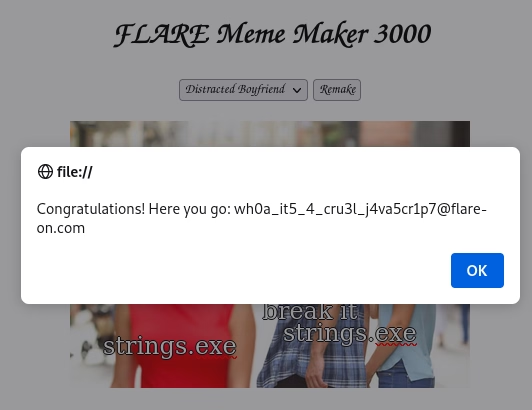
And with these changes set I reloaded the page and waited for the `alert()` to produce a pop-up. The pop-up came, yet the flag was malformed, leading me to believe I had done *something* incorrectly:
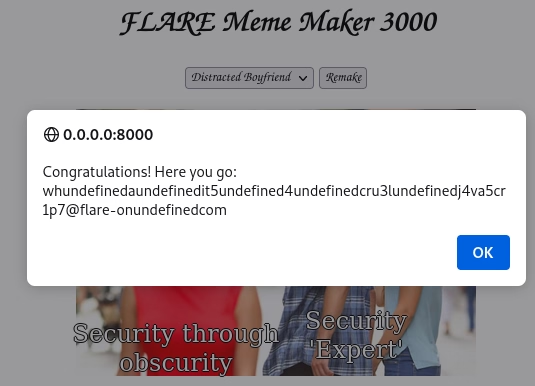
Funnily enough, when I opened the Meme Maker 3000 in another tab and attempted to recreate the mangled flag it spat out the correct, unmangled flag this time?
Challenge 5 - sshd
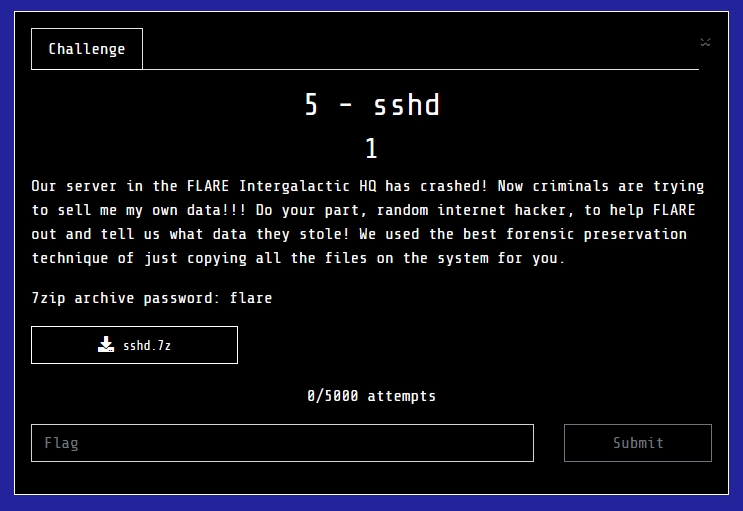
I did not get far into this challenge. By the time I got to it Flare-On was getting to a close, and I had wasted a lot of time on challenge 3.
Finding a beginning
The challenge "binary" this time around was a tar ball. Within the tar ball was, indeed, a slim collection of files belonging to a Linux machine similar to how Fox-IT's acquire would collect a Linux system.
Now, I don't quite know what went wrong here to be honest. I read that there was a crash of this machine, so I tried looking for a coredump, but could not find one. I moved onto looking for weird looking directories or files, but found none really. Because of this, I quickly found myself stuck not knowing what to do. I tried grepping for terms relating to exfiltration data, but found none. I took a look at the ssh-related files, but those all looked "normal".
I found some references to Docker, so I decided to try and port the `ssh_container.tar` into `podman` and see what would happen if I simply *ran* the container. This, of course, was not as straightforward as I had planned. Upon attempting to import the image via `podman` it complained about insufficient UIDs or GIDs:
                        Error produced by podman when loading container image"
                        ❯ podman import ./ssh_container.tar
                        Getting image source signatures
                        Copying blob 01968895cbd9 done   |
                        Error: writing blob: adding layer with blob "sha256:01968895cbd95082ab4d143d2fed7493f91cbe5bc85e7b2b04100ca209177caa"/""/"sha256:01968895cbd95082ab4d143d2fed7493f91cbe5bc85e7b2b04100ca209177caa": unpacking failed (error: exit status 1; output: potentially insufficient UIDs or GIDs available in user namespace (requested 1125857:89939 for /var): Check /etc/subuid and /etc/subgid if configured locally and run "podman system migrate": lchown /var: invalid argument)
I did what `podman` requested of me and adjusted the values in `/etc/subuid` and `/etc/subgid` to no avail. Eventually, I caved and switched to `docker` where it worked the first time (of course):
                        Importing same container image with Docker"
                        ~/Documents/Flare-On/11/5 - sshd
                        ❯ docker import ssh_container.tar
                        sha256:ee8d7b6a17b5030c5fb054905be678aaa9e9946557e2d537d600c60032a77dd8

                        ~/Documents/Flare-On/11/5 - sshd   10s
                        ❯ docker image ls
                        REPOSITORY   TAG       IMAGE ID       CREATED              SIZE
                        <none>       <none>    ee8d7b6a17b5   About a minute ago   725MB
Because I had a feeling I would interact with this container quite a bit, I decided to also give it a better name via `docker tag`:
                        Adding a tag to the container for easier references"
                        ~/Documents/Flare-On/11/5 - sshd
                        ❯ docker image tag ee8d7b6a17b5 flare_sshd

                        ~/Documents/Flare-On/11/5 - sshd
                        ❯ docker image ls
                        REPOSITORY   TAG       IMAGE ID       CREATED         SIZE
                        flare_sshd   latest    ee8d7b6a17b5   3 minutes ago   725MB
Running the container via `docker run -it --rm flare_sshd /bin/bash` dropped me into a bash shell where I could do pretty much the same as by just browsing the file system inside the tar ball. No services appeared to really start, nothing special, not sure what I was expecting to be honest.
Root user's home directory
A quick side note is the `flag.txt` file in the root user's home directory:
                        flag.txt in Root user's home directory"
                        root@9c92753cea0b:~# cat flag.txt
                        ⠀⠀⠀⠀⠀⠀⠀⠀⠀⠀⠀⠀⣧⠀⠀⠀⠀⠀⣿⠀⠀⠀⠀⠀⠀⠀⠀⠀⠀⠀
                        ⠀⠀⠀⠀⠀⠀⠀⠀⠀⠀⠀⢀⣿⣧⠀⠀⠀⢰⡿⡇⠀⠀⠀⠀⠀⠀⠀⠀⠀⠀
                        ⠀⠀⠀⠀⠀⠀⠀⠀⠀⠀⠀⢸⣿⡟⡆⠀⠀⣿⡇⢻⠀⠀⠀⠀⠀⠀⠀⠀⠀⠀
                        ⠀⠀⠀⠀⠀⠀⠀⠀⠀⠀⠀⢸⣿⠀⣿⠀⢰⣿⡇⢸⠀⠀⠀⠀⠀⠀⠀⠀⠀⠀
                        ⠀⠀⠀⠀⠀⠀⠀⠀⠀⠀⠀⢸⣿⡄⢸⠀⢸⣿⡇⢸⠀⠀⠀⠀⠀⠀⠀⠀⠀⠀
                        ⠀⠀⠀⠀⠀⠀⠀⠀⠀⠀⠀⠘⣿⡇⢸⡄⠸⣿⡇⣿⠀⠀⠀⠀⠀⠀⠀⠀⠀⠀
                        ⠀⠀⠀⠀⠀⠀⠀⠀⠀⠀⠀⠀⢿⣿⢸⡅⠀⣿⢠⡏⠀⠀⠀⠀⠀⠀⠀⠀⠀⠀
                        ⠀⠀⠀⠀⠀⠀⠀⠀⠀⠀⠀⠀⠈⣿⣿⣥⣾⣿⣿⠀⠀⠀⠀⠀⠀⠀⠀⠀⠀⠀
                        ⠀⠀⠀⠀⠀⠀⠀⠀⠀⠀⠀⠀⠀⣿⣿⣿⣿⣿⣿⣿⣆⠀⠀⠀⠀⠀⠀⠀⠀⠀
                        ⠀⠀⠀⠀⠀⠀⠀⠀⠀⠀⠀⠀⢸⣿⣿⣿⡿⡿⣿⣿⡿⡅⠀⠀⠀⠀⠀⠀⠀⠀
                        ⠀⠀⠀⠀⠀⠀⠀⠀⠀⠀⠀⠀⢸⠉⠀⠉⡙⢔⠛⣟⢋⠦⢵⠀⠀⠀⠀⠀⠀⠀
                        ⠀⠀⠀⠀⠀⠀⠀⠀⠀⠀⠀⠀⣾⣄⠀⠀⠁⣿⣯⡥⠃⠀⢳⠀⠀⠀⠀⠀⠀⠀
                        ⠀⠀⠀⠀⠀⠀⠀⠀⠀⠀⢀⣴⣿⡇⠀⠀⠀⠐⠠⠊⢀⠀⢸⠀⠀⠀⠀⠀⠀⠀
                        ⠀⠀⠀⠀⠀⠀⠀⢀⣴⣿⣿⣿⡿⠀⠀⠀⠀⠀⠈⠁⠀⠀⠘⣿⣄⠀⠀⠀⠀⠀
                        ⠀⠀⠀⠀⠀⣠⣿⣿⣿⣿⣿⡟⠀⠀⠀⠀⠀⠀⠀⠀⠀⠀⠀⠈⣿⣷⡀⠀⠀⠀
                        ⠀⠀⠀⠀⣾⣿⣿⣿⣿⣿⠋⠀⠀⠀⠀⠀⠀⠀⠀⠀⠀⠀⠀⠀⠈⣿⣿⣧⠀⠀
                        ⠀⠀⠀⡜⣭⠤⢍⣿⡟⠀⠀⠀⠀⠀⠀⠀⠀⠀⠀⠀⠀⠀⠀⠀⠀⢸⢛⢭⣗⠀
                        ⠀⠀⠀⠁⠈⠀⠀⣀⠝⠀⠀⠀⠀⠀⠀⠀⠀⠀⠀⠀⠀⠀⠀⠀⠄⠠⠀⠀⠰⡅
                        ⠀⠀⠀⢀⠀⠀⡀⠡⠀⠀⠀⠀⠀⠀⠀⠀⠀⠀⠀⠀⠀⠀⠀⠀⠀⠁⠔⠠⡕⠀
                        ⠀⠀⠀⠀⣿⣷⣶⠒⠁⠀⠀⠀⠀⠀⠀⠀⠀⠀⠀⠀⠀⠀⠀⠀⠀⢰⠀⠀⠀⠀
                        ⠀⠀⠀⠀⠘⣿⣿⡇⠀⠀⠀⠀⠀⠀⠀⠀⠀⠀⠀⠀⠀⠀⠀⠀⠰⠀⠀⠀⠀⠀
                        ⠀⠀⠀⠀⠀⠈⢿⣿⣦⠀⠀⠀⠀⠀⠀⠀⠀⠀⠀⠀⠀⠀⢠⠊⠉⢆⠀⠀⠀⠀
                        ⠀⢀⠤⠀⠀⢤⣤⣽⣿⣿⣦⣀⢀⡠⢤⡤⠄⠀⠒⠀⠁⠀⠀⠀⢘⠔⠀⠀⠀⠀
                        ⠀⠀⠀⡐⠈⠁⠈⠛⣛⠿⠟⠑⠈⠀⠀⠀⠀⠀⠀⠀⠀⠀⠀⠀⠀⠀⠀⠀⠀⠀
                        ⠀⠀⠉⠑⠒⠀⠁⠀⠀⠀⠀⠀⠀⠀⠀⠀⠀⠀⠀⠀⠀⠀⠀⠀⠀⠀⠀⠀⠀
                        if only it were that easy......
Coredump time
As stated previously, I had somehow missed the coredump for the `sshd` binary present under `/var/lib/systemd/coredump`. Next I decided to load it up into `gdb` and just *see whatever I might get from it* as I haven't ever really worked with `gdb`.
                        root@a3f15c1e722e:/# gdb $(which sshd) /var/lib/systemd/coredump/sshd.core.93794.0.0.11.1725917676
                        ...
                        warning: Can't open file / (deleted) during file-backed mapping note processing
                        [New LWP 7378]
                        [Thread debugging using libthread_db enabled]
                        Using host libthread_db library "/lib/x86_64-linux-gnu/libthread_db.so.1".
                        Core was generated by `sshd: root [priv]      '.
                        Program terminated with signal SIGSEGV, Segmentation fault.
                        #0  0x0000000000000000 in ?? ()
                        (gdb)
So we indeed do have a segmentation fault in the `sshd` process which explains the coredump. Taking a look at the back trace showed the following, minimal hints at what had happened:
                            GDB showing the back trace from our segmentation fault"
                            (gdb) bt full
                            #0  0x0000000000000000 in ?? ()
                            #1  0x00007f4a18c8f88f in ?? () from /lib/x86_64-linux-gnu/liblzma.so.5
                            #2  0x000055b46c7867c0 in ?? ()
                            #3  0x000055b46c73f9d7 in ?? ()
                            #4  0x000055b46c73ff80 in ?? ()
                            #5  0x000055b46c71376b in ?? ()
                            #6  0x000055b46c715f36 in ?? ()
                            #7  0x000055b46c7199e0 in ?? ()
                            #8  0x000055b46c6ec10c in ?? ()
                            #9  0x00007f4a18e5824a in __libc_start_call_main (main=main@entry=0x55b46c6e7d50, argc=argc@entry=4, argv=argv@entry=0x7ffcc6602eb8) at ../sysdeps/nptl/libc_start_call_main.h:58
                            #10 0x00007f4a18e58305 in __libc_start_main_impl (main=0x55b46c6e7d50, argc=4, argv=0x7ffcc6602eb8, init=<optimized out>, fini=<optimized out>, rtld_fini=<optimized out>, stack_end=0x7ffcc6602ea8)
                            #11 0x000055b46c6ec621 in ?? ()
Let's navigate to frame `1` inside `liblzma.so.5` and check what's going on there. To do this we use `frame n` where `n` is the frame we want to select. via the `info frame` command we can get some information about what's currently happening:
                        GDB info frame command output for frame 1"""
                        (gdb) info frame
                        Stack level 1, frame at 0x7ffcc6601fd0:
                         rip = 0x7f4a18c8f88f; saved rip = 0x55b46c7867c0
                         called by frame at 0x7ffcc66020b0, caller of frame at 0x7ffcc6601ea0
                         Arglist at 0x7ffcc6601e98, args:
                         Locals at 0x7ffcc6601e98, Previous frame's sp is 0x7ffcc6601fd0
                         Saved registers:
                          rbx at 0x7ffcc6601f98, rbp at 0x7ffcc6601fa0, r12 at 0x7ffcc6601fa8, r13 at 0x7ffcc6601fb0, r14 at 0x7ffcc6601fb8, r15 at 0x7ffcc6601fc0, rip at 0x7ffcc6601fc8
Next I decided to look at the disassembly surrounding our current frame to see if this could give some kind of indicator as to what went wrong. Google informed that I could do this via `x/<int>i` where `int` is an amount in hex and `x/i` instructs `gdb` to display the output as instructions. The output of this was as follows:
                        GDB disassembly around the current address stored within RIP" linenums="1"
                        (gdb) x/50i 0x00007f4a18c8f800
                          # SNIP
                           0x7f4a18c8f877:      xor    %edi,%edi
                           0x7f4a18c8f879:      call   0x7f4a18c8acf0 <dlsym@plt>
                           0x7f4a18c8f87e:      mov    %ebx,%r8d
                           0x7f4a18c8f881:      mov    %r14,%rcx
                           0x7f4a18c8f884:      mov    %r13,%rdx
                           0x7f4a18c8f887:      mov    %rbp,%rsi
                           0x7f4a18c8f88a:      mov    %r12d,%edi
                           0x7f4a18c8f88d:      call   *%rax
                        => 0x7f4a18c8f88f:      mov    0xe8(%rsp),%rbx
                           0x7f4a18c8f897:      xor    %fs:0x28,%rbx
                          # SNIP
okay, so we can see a call to `dlsym@plt`, and a call following it to a pointer stored in `rax`. Let's first dive into `dlsym@plt` and see what that is all about.
Linux' `LoadLibraryA()`, sorta
`dlsym` is described the following on the online Linux manpage site die.net :
`dlsym()` The function dlsym() takes a "handle" of a dynamic library returned by dlopen() and the null-terminated symbol name, returning the address where that symbol is loaded into memory. If the symbol is not found, in the specified library or any of the libraries that were automatically loaded by dlopen() when that library was loaded, dlsym() returns NULL. (The search performed by dlsym() is breadth first through the dependency tree of these libraries.) Since the value of the symbol could actually be NULL (so that a NULL return from dlsym() need not indicate an error), the correct way to test for an error is to call dlerror() to clear any old error conditions, then call dlsym(), and then call dlerror() again, saving its return value into a variable, and check whether this saved value is not NULL.
Okay, so this sort of sounds like the Linux counterpart to Window's LoadLibraryA and could explain why our binary caused a segmentation fault. Since `dlsym()` can return `NULL` when we expect it to return the address of the expected dynamic library, we can end up in a situation where we attempt to `call` an invalid memory address, thus causing a segmentation fault.
To validate this, let's check what the current value of `RAX`/`EAX` is and whether this is indeed `NULL`. To do this, we can use the `gdb` command `i r` for info registers:
                            GDB command output showing the values stored in the CPU registers for this given frame"
                            gdb) i r
                            rax            0x0                 0
                            rbx            0x1                 1
                            rcx            0x55b46d58e080      94233417015424
                            rdx            0x55b46d58eb20      94233417018144
                            rsi            0x55b46d51dde0      94233416556000
                            rdi            0x200               512
                            rbp            0x55b46d51dde0      0x55b46d51dde0
                            rsp            0x7ffcc6601ea0      0x7ffcc6601ea0
                            # SNIP
And indeed, `RAX` does contain `NULL` and therefor caused our segmentation fault when we attempted to `call` it.
This is about as far as I got before Flare-On ended. I didn't really know *what* to do next. I hadn't taken a look at the previous frames yet, and whether those might be able to help explain why we are doing this `dlsym()` call and subsequent `call RAX`. I have to also admit that I had kinda forgotten about the whole `xz` backdoor that took place so I didn't look deeper into how an exploit for it might've looked.
Now with Flare-On over, and people publishing their solutions, I read one by a mate of mine and how he had tackled it. Reading the write-up I was glad that I had been looking in the right place, but not sure I would've gotten much further had I put more time in before Flare-On ended. The write-up in question can be read over at visit.suspect.network .
Closing thoughts
Thanks to the FLARE team for organising another Flare-On CTF and the challenge authors for creating these challenges :heart:
This year's Flare-On showed me, again, that I still have a lot to learn. Especially challenge 3 really drove the point that point home with how much time I wasted trying to figure what I even had to do. Another learning point is challenge 5 with `gdb`. I feel as though I wasted a lot of time lookup up and doing really mundane things in `gdb` and that's something I want to improve upon as well.